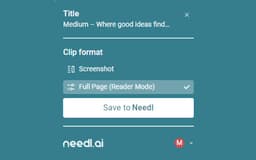
Needl.ai - Chrome Extension
Save web content effortlessly.
Introduction
Save any content from websites to your personal drive within a few clicks.
What stands out?
1. Curated Feeds for critical updates
2. Universal Search for quick retrieval
3. Powerful Processing for insights
4. Priority Assignment for contacts
5. Centralized team collaboration
6. Content embedding into notes
Frequently Asked Questions
What is Needl.ai?
How to use Needl.ai?
How to save web content using Needl.ai?
Reviews & Feedback
Share your experience with the community
0.0
Based on 0 reviews
User Comments (0)
Sort Criteria
Order
No reviews yet. Be the first to share your thoughts!
Statistics
Monthly visits
NaN
Saved by users
0
Rating
0.0/ 5.0
Added on
—
Similar Tools

Use Cases
- Save an article for future reference
- Create a curated feed for breaking news updates
How to Use
1. Install Needl.ai extension. 2. Select web content. 3. Save to Needl Drive.