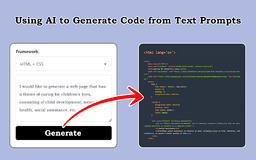
Visual Code Transformer - Chrome Extension
AI tool for converting designs into front-end code
Introduction
Visual Code Transformer is a cutting-edge AI tool that converts screenshots, design drafts, and prompts into front-end code seamlessly. It supports HTML, Tailwind, React, Vue, Bootstrap, and Ionic frameworks, making development effortless and efficient.
What stands out?
AI-powered conversion of screenshots and designs to code
Support for various front-end frameworks
User-friendly extension for seamless code generation
Frequently Asked Questions
What is Visual Code Transformer?
How to use Visual Code Transformer?
Which front-end frameworks does Visual Code Transformer support?
How does Visual Code Transformer accelerate development?
Reviews & Feedback
Share your experience with the community
0.0
Based on 0 reviews
User Comments (0)
Sort Criteria
Order
No reviews yet. Be the first to share your thoughts!
Statistics
Monthly visits
NaN
Saved by users
0
Rating
0.0/ 5.0
Added on
—
Similar Tools

Use Cases
- Convert design drafts into functional front-end code quickly
- Streamline development by translating prompts into code effortlessly
How to Use
Using Visual Code Transformer is straightforward. Upload your screenshots, design drafts, or prompts, select the desired output framework, and let the AI generate the corresponding front-end code instantly.