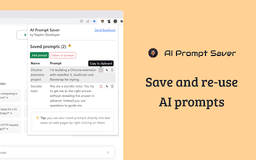
Prompt Manager - Chrome Extension
Save and re-use prompts with ease.
Introduction
Prompt Manager helps you save and re-use prompts
What stands out?
Save and re-use prompts
Secure storage in your browser
Easy insertion of prompts
Frequently Asked Questions
What is Prompt Manager?
How to use Prompt Manager?
How do I add a prompt?
Where are prompts stored?
How do I insert a prompt?
Reviews & Feedback
Share your experience with the community
0.0
Based on 0 reviews
User Comments (0)
Sort Criteria
Order
No reviews yet. Be the first to share your thoughts!
Statistics
Monthly visits
NaN
Saved by users
0
Rating
0.0/ 5.0
Added on
—

Use Cases
- Writing emails
- Taking notes
- Filling out forms
- Creating templates
How to Use
To use Prompt Manager, you can add prompts by selecting the text on a web page or using the extension toolbar button. The prompts are securely stored in your browser only. You can easily insert prompts by right-clicking on a text input area.