AI Assistant Hub - Chrome Extension
Platform for querying multiple AI assistants at once.
AI assistantsMulti-AI queriesInformation gathering
Introduction
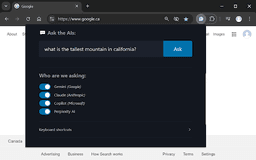
AI Assistant Hub allows users to ask questions and receive answers from multiple AI assistants simultaneously. Users can choose which specific assistants to query for customized responses, enhancing the user experience and information gathering.
Key Features
Ask a question to multiple AI assistants
Customizable selection of AI assistants
Keyboard shortcuts for ease of use
Frequently Asked Questions
What is AI Assistant Hub?
How to use AI Assistant Hub?
How can I ask a question?
Can I choose which AI assistants to ask?
Similar Tools

LimeChat
Revolutionize your e-commerce business with our AI-powered platform that offers support and marketing through WhatsApp. Boost sales and engagement now!

Plagiarism Remover
Eliminate plagiarism in your text with this free AI tool. Enhance your writing by rephrasing content effortlessly. Try it now!

iSlide
Simplify your PowerPoint design with our innovative platform, offering a wide range of templates and AI tools to enhance your presentations.
Use Cases
- Get diverse perspectives on a topic by querying various AI assistants
- Streamline research by using multiple sources of information concurrently
How to Use
To use AI Assistant Hub, simply open the query pop-up using the keyboard shortcut, select your desired assistants, and type your question.