Article.Audio
Convert written content into high-quality audio instantly with Article.Audio.
Introduction
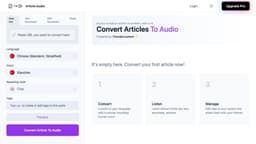
Article.Audio is a tool that allows you to instantly convert articles into high-quality audio. With over 140 available languages and natural-sounding human voices, you can easily convert any written content into audio format.
What stands out?
The core features of Article.Audio include: 1. Instant conversion: Quickly convert articles into audio format. 2. Multiple languages: Choose from over 140 languages for audio conversion. 3. Human-like voices: Enjoy natural-sounding human voices for a better listening experience. 4. Various speaking styles: Select the ideal speaking style, such as chat, narration, newscast, and more. 5. Audio management: Add tags to organize your audios and easily find them later. 6. Sharing options: Share your converted audios with others.
Frequently Asked Questions
What is Article.Audio?
How to use Article.Audio?
What types of documents can be converted into audio?
Can I choose the voice and speaking style for the audio conversion?
Is there a limit on the length of articles that can be converted?
Can I share the converted audios with others?
Can I add tags to manage my audios?
More Information
Article.Audio Company
Article.Audio Company name: Article.Audio .
Article.Audio Login
Article.Audio Login Link: https://article.audio/
Reviews & Feedback
Share your experience with the community
0.0
Based on 0 reviews
User Comments (0)
Sort Criteria
Order
No reviews yet. Be the first to share your thoughts!
Statistics
Monthly visits
NaN
Saved by users
0
Rating
0.0/ 5.0
Added on
—
Use Cases
- Some use cases for Article.Audio include: 1. Accessibility: Make articles accessible to visually impaired individuals by converting them to audio. 2. Multitasking: Listen to articles while doing other tasks, such as exercising, commuting, or cooking. 3. Language learning: Improve language skills by listening to articles in different languages. 4. Content consumption: Easily consume articles without the need to read them. 5. Podcast creation: Convert written content into audio to create podcasts.
How to Use
To use Article.Audio, simply follow these steps: 1. Sign up or log in using your Google account or email. 2. Choose the language of the article you want to convert. 3. Enter the article by either providing a web link, uploading a text or PDF document, or even a photo of the article. 4. Select the preferred voice and speaking style. 5. Click on the 'Convert' button to transform the article into audio. 6. Once the conversion is complete, you can listen to the audio or manage it by adding tags. 7. You can also share the audio with others.