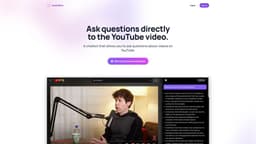
Audio2Doc
Ask questions directly to the chatbot while watching videos.
Introduction
Audio2Doc is a chrome extension that allows users to ask questions to a chatbot while watching videos on YouTube.
What stands out?
Ask questions to chatbot while watching videos
Get instant answers without leaving YouTube
Frequently Asked Questions
What is Audio2Doc?
How to use Audio2Doc?
How can I install the Audio2Doc chrome extension?
Can I ask any type of question to the chatbot?
Will the chatbot interrupt my video watching experience?
Reviews & Feedback
Share your experience with the community
0.0
Based on 0 reviews
User Comments (0)
Sort Criteria
Order
No reviews yet. Be the first to share your thoughts!
Statistics
Monthly visits
NaN
Saved by users
0
Rating
0.0/ 5.0
Added on
—
Use Cases
- Getting additional information about videos on YouTube
How to Use
Install the Audio2Doc chrome extension. While watching a YouTube video, click on the chatbot icon and ask your question. The chatbot will provide instant answers without leaving YouTube.