Photo AI
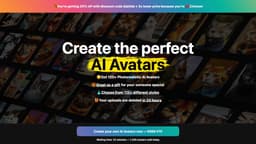
Generate avatars and take realistic photos with Photo AI, the world's first AI Photographer.
Introduction
Photo AI is an AI-powered photo app and the world's first AI Photographer. It allows users to generate different styles of avatars and take realistic photos using artificial intelligence. It offers a wide range of features and provides quick turnaround times.
What stands out?
Avatar AI: Generate 120+ different styles of avatars
Photo Shoots: Create realistic and detailed photos using your AI character
Try on Clothes: Import clothes from the web and try them on your AI model
Design Photorealistic Scenes: Generate photos of desired scenes with specific settings and attire
Magic Editor: Make custom edits to your generated photos
Fast Turnaround: Generate photos in just 124 seconds
Frequently Asked Questions
What is Photo AI?
How to use Photo AI?
How does Photo AI work?
How much does Photo AI cost?
Do you have an affiliate program?
What is an Avatar AI™ Photo Shoot?
Can I have photo shoots in different places and styles?
How long does it take for the photo shoot to be ready?
More Information
Photo AI Pricing
Photo AI Pricing Link: https://photoai.com/upgrade?hash=
Photo AI Twitter
Photo AI Twitter Link: https://twitter.com/levelsio
Reviews & Feedback
Share your experience with the community
0.0
Based on 0 reviews
User Comments (0)
Sort Criteria
Order
No reviews yet. Be the first to share your thoughts!
Statistics
Monthly visits
NaN
Saved by users
0
Rating
0.0/ 5.0
Added on
—
Similar Tools

Picsart
Unleash your creativity with Picsart - an innovative photo editing app that offers a wide range of tools and filters to enhance your images.

Max Studio AI
Enhance your images and unleash your creativity with AI tools all in one platform. Boost your image editing skills effortlessly!

Grok
AI assistant that promotes truth and objectivity with various features.

KLING AI
Create one-of-a-kind images and videos with our Generative AI tools. Unleash your creativity and explore endless possibilities!
MidJourney
AI platform for creating and exploring images with community input.
Use Cases
- Create personalized avatars
- Develop realistic photos for various purposes (e.g., fashion, marketing)
- Try out different clothing styles without physically trying them on
- Design unique and creative scenes for art or photography projects
How to Use
To use Photo AI, you can start by creating your own AI character by uploading at least 30 diverse photos of yourself. Once trained, you can use the avatar to create photorealistic scenes, try on clothes, and design your own photo shoots. Simply describe the desired scene or outfit, and Photo AI will generate a highly realistic photo based on your input. You can also use the Magic Editor to make custom edits to your generated photos.