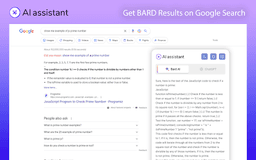
Bard for Google - Chrome Extension
Chrome extension for accessing Google Bard AI responses.
Introduction
Bard for Google is a Chrome extension that enables users to access Google Bard AI responses alongside Google search results.
What stands out?
Access Google Bard AI responses
Seamlessly integrated with Google search
Enhanced search experience
Frequently Asked Questions
What is Bard for Google?
How to use Bard for Google?
How can I install Bard for Google?
Can I disable Bard AI responses if I only want to view regular search results?
Is Bard for Google available for other web browsers?
Reviews & Feedback
Share your experience with the community
0.0
Based on 0 reviews
User Comments (0)
Sort Criteria
Order
No reviews yet. Be the first to share your thoughts!
Statistics
Monthly visits
NaN
Saved by users
0
Rating
0.0/ 5.0
Added on
—
Similar Tools

Kagi Search
Discover a top-tier search engine that prioritizes user privacy and delivers an exceptional browsing experience.

秘塔AI搜索
No ads, just instant results. Find what you're looking for quickly with this ad-free app.

Semantic Scholar
Discover relevant scientific literature with Semantic Scholar, a free AI research tool that helps scholars find the information they need.
Consensus
Consensus uses AI to find insights in research papers.
Perplexity AI
Innovative AI search engine harnessing advanced language models and powerful search algorithms for enhanced search capabilities.
Use Cases
- Finding relevant information
- Getting AI-generated insights
- Exploring alternative perspectives
How to Use
To use Bard for Google, simply install the Chrome extension from the provided GitHub repository. Once installed, perform a Google search and the Bard AI responses will be displayed alongside the search results.