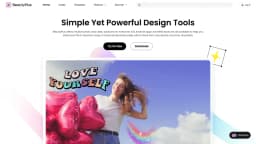
BeautyPlus
AI-powered beauty camera & photo editing app
Introduction
BeautyPlus is an AI-powered beauty camera and photo editing app.
What stands out?
Beauty camera with AI-powered photo editing
Selfie editing tools
Background removal tool
Photo merging tool
Filter effects
Makeup looks
Frequently Asked Questions
What is BeautyPlus?
How to use BeautyPlus?
Can I use BeautyPlus on my iOS device?
Is BeautyPlus free to use?
Can I edit videos with BeautyPlus?
More Information
BeautyPlus Support Email & Customer service contact & Refund contact etc.
Here is the BeautyPlus support email for customer service: [email protected] .
BeautyPlus Company
BeautyPlus Company name: Pixocial Technology (Singapore) Pte. Ltd. .
BeautyPlus Facebook
BeautyPlus Facebook Link: https://www.facebook.com/BeautyPlus
BeautyPlus Youtube
BeautyPlus Youtube Link: https://www.youtube.com/c/beautyplusbestselfiecameasyphotoeditor
BeautyPlus Tiktok
BeautyPlus Tiktok Link: https://www.tiktok.com/@beautyplus_app
BeautyPlus Instagram
BeautyPlus Instagram Link: https://www.instagram.com/beautyplusapp/
Reviews & Feedback
Share your experience with the community
0.0
Based on 0 reviews
User Comments (0)
Sort Criteria
Order
No reviews yet. Be the first to share your thoughts!
Statistics
Monthly visits
NaN
Saved by users
0
Rating
0.0/ 5.0
Added on
—
Similar Tools

Picsart
Unleash your creativity with Picsart - an innovative photo editing app that offers a wide range of tools and filters to enhance your images.

Max Studio AI
Enhance your images and unleash your creativity with AI tools all in one platform. Boost your image editing skills effortlessly!

Grok
AI assistant that promotes truth and objectivity with various features.

KLING AI
Create one-of-a-kind images and videos with our Generative AI tools. Unleash your creativity and explore endless possibilities!
MidJourney
AI platform for creating and exploring images with community input.
Use Cases
- Editing selfies like a pro
- Cleaning up pictures
- Adding background to photos
- Unblurring images
- Merging multiple photos into one frame
How to Use
1. Download the BeautyPlus app on your iOS or Android device. 2. Open the app and select a photo or take a selfie. 3. Use the wide selection of editing tools to enhance your photo. 4. Apply filters, remove background, add stickers, text, and music. 5. Save or share your edited photo with friends and on social media platforms.