BeC
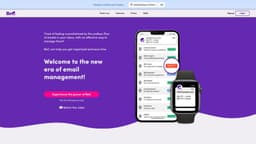
BeC is an AI service for email classification and notification based on priority.
Introduction
BeC is a service that uses artificial intelligence to automatically classify and organize your emails based on their priority. It also provides personalized notifications for important emails.
What stands out?
Automatic email classification and organization based on priority
Personalized notifications for important emails
Integration with existing email provider and client
Support for multiple languages
Customizable priority levels
Cumulative notifications for multiple priority emails
Ability to set notifications for different devices
Frequently Asked Questions
What is BeC?
How to use BeC?
How does BeC classify emails?
Can I customize the priority levels in BeC?
Can I set notifications for different devices?
Does BeC support multiple languages?
Is BeC compatible with all email providers?
More Information
BeC Support Email & Customer service contact & Refund contact etc.
More Contact, visit the contact us page(https://www.bec-ai.com/contactus)
BeC Company
BeC Company name: IANUSTEC SRL .
BeC Login
BeC Login Link: https://app.bec-ai.com
BeC Sign up
BeC Sign up Link: https://www.bec-ai.com/signup
BeC Pricing
BeC Pricing Link: https://www.bec-ai.com/#pricing
BeC Facebook
BeC Facebook Link: https://www.facebook.com/BeC-by-Ianustec-106564125480216
BeC Youtube
BeC Youtube Link: https://www.youtube.com/channel/UCAwS8mLOfAaYLVIYgF7z84w
BeC Linkedin
BeC Linkedin Link: https://www.linkedin.com/company/ianustec
BeC Instagram
BeC Instagram Link: https://www.instagram.com/BeC.by.Ianustec/
Reviews & Feedback
Share your experience with the community
0.0
Based on 0 reviews
User Comments (0)
Sort Criteria
Order
No reviews yet. Be the first to share your thoughts!
Statistics
Monthly visits
NaN
Saved by users
0
Rating
0.0/ 5.0
Added on
—
Similar Tools

Pixelcut
Easily create stunning product photos and ads with our free online design tool. Remove backgrounds and erase objects effortlessly.

Wondershare
Discover innovative tools for enhancing creativity, productivity, and efficiency with our app. Unleash your potential today!

TurboScribe
Unlimited AI transcription with 99.8% accuracy in 98+ languages.

Intercom
Get quicker solutions with Automation and human assistance. Enhance support efficiency for faster issue resolutions.

Alpha3D
Transform 2D images into 3D assets with generative AI.
Use Cases
- Efficiently manage a large volume of work-related emails
- Separate important emails from advertisements and newsletters in personal mailbox
- Avoid distractions and stay focused on important tasks
- Easily find and prioritize emails related to specific projects or clients
- Simplify the management of multiple email accounts
How to Use
To use BeC, you simply need to sign up for an account and add your email address. BeC will automatically integrate with your existing email provider and client. It will then start processing and categorizing your incoming emails based on your chosen priority levels. You can also customize your notification settings to only receive alerts for important emails on specific devices.