BestRegards
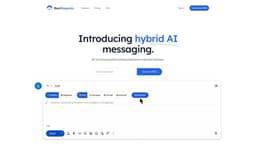
Generate personalized and professional email responses with BestRegards Chrome extension.
Introduction
BestRegards is a Chrome extension that uses AI to help users generate personalized and professional email and message responses with just a few clicks.
What stands out?
Context detection: BestRegards reads the email or message you're replying to and understands the context to generate the best response.
Magic composing: Give it just a few words and it will try to generate a complete response accordingly.
Polyglot, by default: BestRegards can answer in whatever language your interlocutor is writing, supporting all major languages by default.
Use it anywhere: Access the pop-up from any website in a few clicks and generate any kind of reply by adding the starting message.
Frequently Asked Questions
What is BestRegards?
How to use BestRegards?
What is BestRegards?
How does BestRegards work?
Can I use BestRegards with any email service?
Is it necessary to have programming skills to use BestRegards?
Will BestRegards generate the exact same response for similar messages?
Can I customize the responses generated by BestRegards?
Can I use BestRegards with different languages?
Does BestRegards store my email or messages?
More Information
BestRegards Login
BestRegards Login Link: https://bestregards.app/auth/signin
BestRegards Pricing
BestRegards Pricing Link: https://bestregards.app/#pricing
Reviews & Feedback
Share your experience with the community
0.0
Based on 0 reviews
User Comments (0)
Sort Criteria
Order
No reviews yet. Be the first to share your thoughts!
Statistics
Monthly visits
NaN
Saved by users
0
Rating
0.0/ 5.0
Added on
—
Similar Tools

Airtable Assistant
Easily create apps and analyze data with our AI tool, no coding required. Build and analyze without the hassle of programming.

Grok
AI assistant that promotes truth and objectivity with various features.

NoteGPT
Summarize videos, articles, and text with AI. Chat with AI assistant. Transcript generator. Automated note-taking. Folder management.

PixAI - AI Art Generator
Create stunning anime art effortlessly.

DeepAI
AI tools for creative people.
Use Cases
- Save time by generating personalized and professional email responses quickly.
- Improve productivity by writing emails and messages more efficiently.
- Easily communicate in different languages with BestRegards's multi-language support.
- Write better email and message responses with the help of AI technology.
- Access BestRegards from any website to generate replies on the go.
How to Use
To use BestRegards, simply install the Chrome extension and open it while composing an email or message. The AI will analyze the context of the message you are responding to and generate a response based on your selected tone and interest level. You can review and edit the generated response before sending it.