BulkGPT
Streamline ChatGPT with batch processing.
Introduction
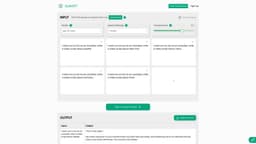
BulkGPT is a tool designed to streamline the ChatGPT experience by allowing users to submit multiple requests simultaneously and export the results to a single CSV file.
What stands out?
Batch processing of up to 5000 ChatGPT tasks simultaneously
Seamless data import from CSV
Versatile export options including CSV, JSON, HTML, MD
GPT-4/3.5/3.5-16k with Web Browsing
Fast parallel processing with up to 10 Threads
Asynchronous Processing
GPT-4 Access
GPT-3.5-Turbo-16k Access
CSV Import Support
Multiple File Formats Export Support
GPT-3.5-Turbo Access
Frequently Asked Questions
What is BulkGPT?
How to use BulkGPT?
What is BulkGPT?
How does BulkGPT work?
What are the use cases for BulkGPT?
How can I use BulkGPT?
More Information
BulkGPT Discord
Here is the BulkGPT Discord: https://discord.gg/ERdeBNJTQN. For more Discord message, please click here(/discord/erdebnjtqn).
BulkGPT Support Email & Customer service contact & Refund contact etc.
More Contact, visit the contact us page(https://www.bulkgpt.ai/contact)
BulkGPT Company
BulkGPT Company name: BulkGPT, ISOTOPE LLC .
BulkGPT Login
BulkGPT Login Link: https://www.bulkgpt.ai/sign_in
BulkGPT Pricing
BulkGPT Pricing Link: https://www.bulkgpt.ai/pricing
BulkGPT Facebook
BulkGPT Facebook Link: https://www.facebook.com/profile.php?id=100094551705825
BulkGPT Linkedin
BulkGPT Linkedin Link: https://www.linkedin.com/company/bulkgpt/
Reviews & Feedback
Share your experience with the community
0.0
Based on 0 reviews
User Comments (0)
Sort Criteria
Order
No reviews yet. Be the first to share your thoughts!
Statistics
Monthly visits
NaN
Saved by users
0
Rating
0.0/ 5.0
Added on
—
Similar Tools

Airtable Assistant
Easily create apps and analyze data with our AI tool, no coding required. Build and analyze without the hassle of programming.

Grok
AI assistant that promotes truth and objectivity with various features.

NoteGPT
Summarize videos, articles, and text with AI. Chat with AI assistant. Transcript generator. Automated note-taking. Folder management.

PixAI - AI Art Generator
Create stunning anime art effortlessly.

DeepAI
AI tools for creative people.
Use Cases
- SEO Content Creation
- E-commerce
- Marketing
- Finance
- Human Resources
- Education
- Customer Support
How to Use
To use BulkGPT, follow these three simple steps: 1. Upload your batch ChatGPT inputs from a CSV file or fill in the input boxes. 2. Sit back and relax as BulkGPT performs the batch requests concurrently. 3. Once the requests are complete, download your data in any format and utilize it as needed.