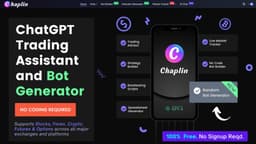
Chaplin App
Chaplin App simplifies trading for non-coders by using AI and allowing users to build bots.
trading assistantbot builderindicator generator
Introduction
Chaplin App is an AI-powered trading assistant and bot builder that simplifies the trading process for non-coders. It allows users to build indicators, backtest strategies, and launch trading bots without writing code.
Key Features
1. Ai Advisor: Provides trading strategy recommendations based on user preferences and experience level. 2. Bot Builder: Allows users to create sophisticated trading bots without coding. 3. Indicator Generator: Generates custom technical analysis indicators for trading platforms. 4. Spreadsheet Generator: Provides easy-to-use spreadsheets for technical analysis of stocks, forex, and crypto markets. 5. Pine Script Indicator: Generates Pine Script codes for implementing custom indicators in TradingView.
Frequently Asked Questions
What is Chaplin App?
How to use Chaplin App?
What is Chaplin App?
How can I use Chaplin App?
What are the core features of Chaplin App?
What are the use cases of Chaplin App?
Similar Tools

CodeFast
Quickly learn coding to create successful online ventures with this app designed for fast-paced business growth. Start building today!

Genie AI
Experience a versatile AI chatbot capable of handling multiple tasks with ease. Engage with our multi-model application today!

DhiWise
Revolutionize your software development process with the Agentic AI platform - the ultimate tool for automating the software development lifecycle.
Use Cases
- 1. Non-coders: Traders who are not proficient in coding can use Chaplin App to build trading bots and generate indicators without writing code. 3. Technical Analysis: Traders can use the Indicator Generator and Spreadsheet Generator to perform technical analysis on different markets. 3. Strategy Development: Traders can leverage the Bot Builder and Ai Advisor to develop and backtest trading strategies suited to their preferences and goals.
How to Use
1. Access the Chaplin App website. 2. Explore the available tools and features, such as the Ai Advisor, Bot Builder, Indicator Generator, and Spreadsheet Generator. 3. Depending on your trading needs, select the appropriate tool and provide the necessary inputs or preferences. 4. Follow the prompts and instructions provided to generate trading strategies, bot scripts, technical analysis spreadsheets, or indicator codes. 5. Implement the generated strategies or codes in your preferred trading platform or exchange. 6. Monitor and manage your trades based on the generated strategies or codes.