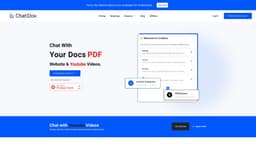
AI Personal Assistant
An AI-powered personal assistant for diverse data integration and multilingual communication.
Introduction
An AI-powered personal assistant that allows users to give instructions and interact with various data sources and languages.
What stands out?
AI-powered personal assistant
Integration with multiple data sources
Support for multiple languages
Chat and interact with the assistant
Frequently Asked Questions
What is AI Personal Assistant?
How to use AI Personal Assistant?
Can I add my own custom data sources?
Is there a limit to the number of data sources I can add?
Can I chat with the assistant in different languages?
Is the personal assistant powered by AI?
More Information
AI Personal Assistant Discord
Here is the AI Personal Assistant Discord: https://discord.gg/BSjWBD2nre. For more Discord message, please click here(/discord/bsjwbd2nre-1).
AI Personal Assistant Support Email & Customer service contact & Refund contact etc.
More Contact, visit the contact us page(https://www.chatdox.com/contact)
AI Personal Assistant Company
AI Personal Assistant Company name: ChatDox .
AI Personal Assistant Login
AI Personal Assistant Login Link: https://app.chatdox.com/signin
AI Personal Assistant Sign up
AI Personal Assistant Sign up Link: https://app.chatdox.com/signup
AI Personal Assistant Pricing
AI Personal Assistant Pricing Link: https://www.chatdox.com/pricing
AI Personal Assistant Linkedin
AI Personal Assistant Linkedin Link: https://www.linkedin.com/company/chatdox/
AI Personal Assistant Twitter
AI Personal Assistant Twitter Link: https://twitter.com/chat_dox
Reviews & Feedback
Share your experience with the community
0.0
Based on 0 reviews
User Comments (0)
Sort Criteria
Order
No reviews yet. Be the first to share your thoughts!
Statistics
Monthly visits
NaN
Saved by users
0
Rating
0.0/ 5.0
Added on
—
Use Cases
- Streamlining personal tasks and organization
- Language translation and communication
- Gathering and analyzing data from various sources
- Multilingual research and information retrieval
How to Use
1. Sign up and create an account. 2. Add multiple data sources, including audio, videos, recordings, websites, and documents. 3. Chat with the personal assistant using multiple languages. 4. Give instructions and interact with the data sources.