ChatGPT Browser Extension - Chrome Extension
Boost Quora content with ChatGPT
Introduction
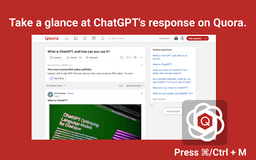
A browser extension that enhances content creation using ChatGPT on Quora
What stands out?
Easy toolbar access
AI conversation initiation
Quick chat.openai.com/chat access
Web page answer retrieval
Frequently Asked Questions
What is ChatGPT Browser Extension?
How to use ChatGPT Browser Extension?
Encountering error?
Reviews & Feedback
Share your experience with the community
0.0
Based on 0 reviews
User Comments (0)
Sort Criteria
Order
No reviews yet. Be the first to share your thoughts!
Statistics
Monthly visits
NaN
Saved by users
0
Rating
0.0/ 5.0
Added on
—
Similar Tools
Use Cases
- Enhancing Quora responses with AI
- Creating engaging content efficiently
How to Use
1. Highlight online content. 2. Open extension with Cmd+M (Mac) or Ctrl+M (Windows). 3. Choose action: reply, comment, shorten content, or others. 4. Switch to https://chat.openai.com/chat. 5. Copy ChatGPT response to Quora. 6. 80% response ready!