ChatGPT Batch Tasks - Chrome Extension
Bulk run ChatGPT tasks without OpenAI token fees.
Introduction
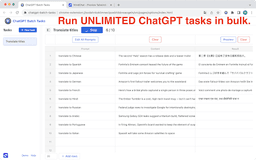
Run unlimited ChatGPT tasks in bulk, NO OpenAI token needed.
What stands out?
Bulk running of ChatGPT tasks
Export results in various formats
Frequently Asked Questions
What is ChatGPT Batch Tasks?
How to use ChatGPT Batch Tasks?
Do I need an OpenAI token to use this extension?
Can I export the results of the ChatGPT tasks?
Is this extension free to use?
Reviews & Feedback
Share your experience with the community
0.0
Based on 0 reviews
User Comments (0)
Sort Criteria
Order
No reviews yet. Be the first to share your thoughts!
Statistics
Monthly visits
NaN
Saved by users
0
Rating
0.0/ 5.0
Added on
—
Similar Tools
Use Cases
- Content Creation: Automatically generate blog posts, press releases, social media posts, or academic papers.
- Educational Assistance: Provide automated learning materials for students, such as auto-generated study guides or practice questions.
- Language Translation and Processing: Batch process text translation or language processing tasks.
- Technical Documentation Writing: Automatically generate or update software documentation, user manuals, and FAQs.
- Advertising and Marketing Creativity: Batch generate ad copies, marketing strategies, and brand promotion content.
- Human Resources Management: Assist in writing job ads, employee training materials, and employee handbooks.
- Data Analysis: Use ChatGPT to interpret complex datasets or generate reports.
- Legal Document Production: Batch generate or review contracts, legal documents, and other law-related documents.
- Market Research: Automate the generation of market trend reports or competitive analyses.
- Creative Writing Assistance: Batch generate short stories, novel concepts, or screenplay drafts.
- Email and Communication Management: Automatically compose and format business emails, newsletters, or invitations.
- Social Media Management: Generate social media strategy reports, or batch create social media content plans.
- Customer Feedback Analysis: Analyze large volumes of customer feedback, categorize as positive or negative, and generate summary reports and improvement suggestions.
How to Use
1. Install the ChatGPT Batch Tasks Chrome extension. 2. Fill in the prompt with the content you want ChatGPT to generate or process. 3. Click 'Run all' to run the tasks in bulk.