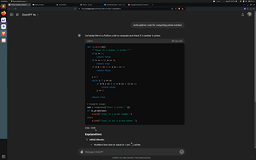
Code Copy Extension - Chrome Extension
Easily copy code outputs without scrolling.
Introduction
The Code Copy Extension is designed to enhance the ChatGPT user experience by allowing users to easily copy code outputs without scrolling. This extension addresses the common annoyance of having to navigate back to access code snippets, providing a more seamless interaction.
What stands out?
Instantly copy code without scrolling
Frequently Asked Questions
What is Code Copy Extension?
How to use Code Copy Extension?
Is the Code Copy Extension free to use?
Reviews & Feedback
Share your experience with the community
0.0
Based on 0 reviews
User Comments (0)
Sort Criteria
Order
No reviews yet. Be the first to share your thoughts!
Statistics
Monthly visits
NaN
Saved by users
0
Rating
0.0/ 5.0
Added on
—
Similar Tools


Use Cases
- Quickly copy code snippets generated by ChatGPT
How to Use
To use the Code Copy Extension, simply install it in your browser, and whenever you receive a code output, click on the extension icon to copy it instantly without the need to scroll.