ChatGPT Exporter - Chrome Extension
Extract ChatGPT conversations easily in various file formats.
Introduction
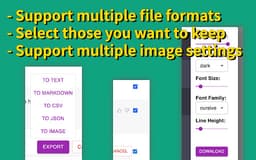
ChatGPT Exporter is a versatile tool for extracting ChatGPT conversations. It supports multiple file formats like Markdown, Text, JSON, CSV and Images. It also allows you to select the conversations you want to keep, and offers various image settings.
What stands out?
Support for multiple file formats
Selective conversation extraction
Multiple image settings
User-friendly interface
Frequently Asked Questions
What is ChatGPT Exporter?
How to use ChatGPT Exporter?
What file formats does ChatGPT Exporter support?
Can I choose which conversations to export?
Can I customize the image settings when exporting?
Is ChatGPT Exporter easy to use?
Where can I get support for ChatGPT Exporter?
Reviews & Feedback
Share your experience with the community
0.0
Based on 0 reviews
User Comments (0)
Sort Criteria
Order
No reviews yet. Be the first to share your thoughts!
Statistics
Monthly visits
NaN
Saved by users
0
Rating
0.0/ 5.0
Added on
—

Use Cases
- Research
- Training
- Entertainment
How to Use
To use ChatGPT Exporter, simply install the extension on your Chrome browser. Once installed, you can access the tool by clicking on its icon. From there, you can choose the conversations you want to export and select the desired file format. You can also customize the image settings if needed. Once you're done, click the export button and the conversations will be saved in the selected format.