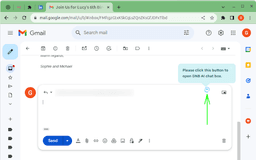
ChatGPT Gmail AutoReply - Chrome Extension
Enhance your Gmail experience with OpenAI's GPT-4 powered auto-reply suggestions.
Introduction
ChatGPT Gmail AutoReply is an innovative Chrome extension that utilizes OpenAI's GPT-4 technology to enhance your Gmail experience.
What stands out?
Smart auto-reply suggestions powered by OpenAI's GPT-4
Seamless integration with Gmail
Time-saving and efficient email management
Improved response accuracy and language comprehension
Customizable auto-reply templates
Frequently Asked Questions
What is ChatGPT Gmail AutoReply?
How to use ChatGPT Gmail AutoReply?
How does ChatGPT Gmail AutoReply work?
Is ChatGPT Gmail AutoReply free to use?
Can I customize the auto-reply templates?
Does ChatGPT Gmail AutoReply work with multiple Gmail accounts?
Is my email content stored or accessed by ChatGPT Gmail AutoReply?
Reviews & Feedback
Share your experience with the community
0.0
Based on 0 reviews
User Comments (0)
Sort Criteria
Order
No reviews yet. Be the first to share your thoughts!
Statistics
Monthly visits
NaN
Saved by users
0
Rating
0.0/ 5.0
Added on
—
Similar Tools

Airtable Assistant
Easily create apps and analyze data with our AI tool, no coding required. Build and analyze without the hassle of programming.

Grok
AI assistant that promotes truth and objectivity with various features.

NoteGPT
Summarize videos, articles, and text with AI. Chat with AI assistant. Transcript generator. Automated note-taking. Folder management.

PixAI - AI Art Generator
Create stunning anime art effortlessly.

DeepAI
AI tools for creative people.
Use Cases
- Effortlessly respond to a high volume of emails
- Increase productivity by reducing time spent on composing replies
- Optimize email communication with personalized and accurate responses
- Automate responses during out-of-office periods
How to Use
To use ChatGPT Gmail AutoReply, simply install the Chrome extension and grant necessary permissions. Once installed, the extension will automatically provide smart suggestions for auto-replying to your Gmail emails.