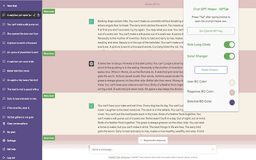
ChatGPT Helper - GPTab Chrome Extension - Chrome Extension
Enhance ChatGPT with GPT-3.5 Turbo, colorful customization, and chat decluttering.
AI assistantChrome ExtensionOpenAI API
Introduction
Supercharge your ChatGPT experience with the ChatGPT Helper - GPTab Chrome Extension! Unlock the power of GPT-3.5 Turbo for smarter interactions, customize your chat interface with vibrant colors, and declutter your view by hiding long chats.
Key Features
Integrated GPT-3.5 Turbo assistant
Customizable colors
Hide long chats
Frequently Asked Questions
What is ChatGPT Helper - GPTab Chrome Extension?
How to use ChatGPT Helper - GPTab Chrome Extension?
How to access the GPT-3.5 Turbo assistant?
Similar Tools

LimeChat
Revolutionize your e-commerce business with our AI-powered platform that offers support and marketing through WhatsApp. Boost sales and engagement now!

Gethookd
Revolutionize your ad creation and performance with our AI platform. Optimize your ads like never before for maximum results.

Clodura.AI
Discover GenAI, the ultimate sales prospecting platform for generating leads and engaging with potential customers effectively.
Use Cases
- Enhancing chat input with AI suggestions
- Personalizing chat interface colors
- Improving chat readability by hiding long messages
How to Use
To use ChatGPT Helper - GPTab Chrome Extension, install the extension, set your OpenAI API key, and access chat.openai.com. Press the "Tab" key while typing a message for AI assistance.