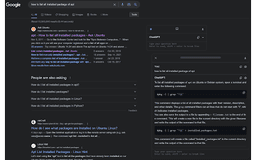
ChatGPTBox - Chrome Extension
Versatile chat dialog box tool
chat dialog boxAPI supportintegration
Introduction
A versatile and powerful chat dialog box integration tool for web browsing
Key Features
Chat dialog box integration
Support for mobile devices
API support including GPT-3.5 and GPT-4
Integration with commonly used websites
Custom queries for search engines
Selection tools for various tasks
Static cards for multi-branch conversations
Powerful rendering support
Language preference and custom API address support
Adaptable selection tools
Frequently Asked Questions
What is ChatGPTBox?
How to use ChatGPTBox?
How do I access the chat dialog box?
Similar Tools

LimeChat
Revolutionize your e-commerce business with our AI-powered platform that offers support and marketing through WhatsApp. Boost sales and engagement now!

Gethookd
Revolutionize your ad creation and performance with our AI platform. Optimize your ads like never before for maximum results.

Clodura.AI
Discover GenAI, the ultimate sales prospecting platform for generating leads and engaging with potential customers effectively.
Use Cases
- Quickly summarizing articles
- Translate text
- Conduct sentiment analysis
- Save chat records
- Integrate with search engines
How to Use
To use ChatGPTBox, simply press Ctrl+B to call up the chat dialog box on any page. For summarizing a page, use Alt+B. The independent conversation page can be accessed with Ctrl+Shift+H. Explore multiple API support, integration options, and selection tools for various tasks.