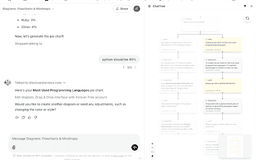
ChatTree - Chrome Extension
Transforms ChatGPT chats into an interactive tree view.
Introduction
ChatTree is a browser extension that transforms ChatGPT conversations into an interactive tree visualization, allowing users to navigate complex discussions easily. It integrates with chatgpt.com and ensures all data stays local in the browser, enhancing privacy while managing conversation threads effectively.
What stands out?
Interactive Tree View
Branch Navigation
Message Editing
Local Processing
Side Panel Integration
Frequently Asked Questions
What is ChatTree?
How to use ChatTree?
Is ChatTree privacy-focused?
What types of discussions is ChatTree useful for?
Reviews & Feedback
Share your experience with the community
0.0
Based on 0 reviews
User Comments (0)
Sort Criteria
Order
No reviews yet. Be the first to share your thoughts!
Statistics
Monthly visits
NaN
Saved by users
0
Rating
0.0/ 5.0
Added on
—
Similar Tools

AI PDF Summarizer by PDF Guru
Simplify PDFs with AI! Summarize, extract key points, ask questions, and translate in 80+ languages. Perfect for work, study, or research.
DeepSeek
Cutting-edge AI platform for programming and chatting with publicly available models, offering advanced capabilities and features.
PolyBuzz
PolyBuzz offers free, private, and unrestricted AI chat and immersive roleplay with over 20 million characters.

AI Therapy
Your personal AI therapist for round-the-clock mental health support.

Wanderboat AI Travel Planner
Discover your personalized travel experiences with AI travel planner. Tailored recommendations for your perfect trip. Start planning now!
Use Cases
- Complex problem-solving discussions
- Multi-branch brainstorming
- Educational conversations
- Code review discussions
- Project planning chats
How to Use
To use ChatTree, install the extension from the Chrome Web Store and open ChatGPT. As you engage in conversations, ChatTree automatically visualizes your chat history as a tree in the side panel. You can click on branches to navigate different conversation paths or edit messages directly from the tree view.