Codejet.ai
Codejet.ai is a tool that converts designs into production-ready code, helping builders code 50% faster.
Introduction
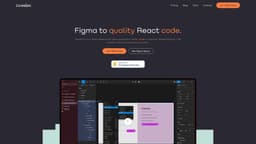
Codejet.ai is a jet speed design-to-code transformation tool that helps builders code 50% faster by converting designs to production-ready code. It simplifies the development workflow by transforming Figma designs into clean and open TypeScript or HTML code, ensuring high-quality results.
What stands out?
Jet speed design-to-code transformation
Conversion of Figma designs to clean and open TypeScript or HTML code
Responsive design to ensure compatibility on any device
Structured and tested code with proper organization of components and elements
Easy customization with basic components and autolayout
Clean, open-source code without dependencies on external libraries
Support for React and HTML exports (with plans to expand to other programming languages)
AI model in development for automated identification of interactive components
Teams, workspaces, and projects feature to collaborate and refine code
Codejet no-code environment for focused development processes
Text2design converter tool to translate human language into designs
Frequently Asked Questions
What is Codejet.ai?
How to use Codejet.ai?
What programming languages does Codejet.ai support?
Does Codejet.ai generate responsive designs?
Is the generated code organized and tested?
Can I customize the Figma project for Codejet conversion?
Does Codejet.ai require manual identification of interactive components?
Can Codejet.ai be used by teams for collaboration?
What is the Codejet no-code environment?
What is the Text2design converter tool?
More Information
Codejet.ai Discord
Here is the Codejet.ai Discord: https://discord.gg/XHwhKVAQM9. For more Discord message, please click here(/discord/xhwhkvaqm9).
Codejet.ai Support Email & Customer service contact & Refund contact etc.
More Contact, visit the contact us page(https://www.codejet.ai/contact)
Codejet.ai Company
Codejet.ai Company name: Codejet .
Codejet.ai Login
Codejet.ai Login Link: https://app.codejet.ai/login/
Codejet.ai Pricing
Codejet.ai Pricing Link: https://www.codejet.ai/pricing
Codejet.ai Facebook
Codejet.ai Facebook Link: https://www.facebook.com/codejetai
Codejet.ai Linkedin
Codejet.ai Linkedin Link: https://www.linkedin.com/company/codejetai/
Codejet.ai Twitter
Codejet.ai Twitter Link: https://twitter.com/Codejetai
Reviews & Feedback
Share your experience with the community
0.0
Based on 0 reviews
User Comments (0)
Sort Criteria
Order
No reviews yet. Be the first to share your thoughts!
Statistics
Monthly visits
NaN
Saved by users
0
Rating
0.0/ 5.0
Added on
—
Similar Tools

Pixelcut
Easily create stunning product photos and ads with our free online design tool. Remove backgrounds and erase objects effortlessly.

Wondershare
Discover innovative tools for enhancing creativity, productivity, and efficiency with our app. Unleash your potential today!

TurboScribe
Unlimited AI transcription with 99.8% accuracy in 98+ languages.

Intercom
Get quicker solutions with Automation and human assistance. Enhance support efficiency for faster issue resolutions.
GirlfriendGPT - The AI Companion Chatroom
An uncensored AI companion chatroom for SFW and NSFW conversations.
Use Cases
- Streamline the process of converting designs into production-ready code
- Save time and effort by automating code generation from Figma designs
- Improve collaboration between designers and developers
- Achieve consistent and high-quality code outputs
- Simplify the development workflow without compromising quality
- Easily customize Figma projects for Codejet conversion
- Effortlessly create responsive web designs
- Accelerate frontend development with code delivery in seconds
- Bridge the gap between visual concepts and tangible code
- Enhance productivity for both designers and developers
How to Use
To use Codejet.ai, follow these steps: 1. Design in Figma: - Create or adapt a design using Codejet components in Figma. - Make sure to use the Codejet Assistant Figma plugin for proper conversion. 2. Export to Codejet: - Copy the link of the specific screen in Figma that you want to convert. - Paste the link in Codejet and specify the desired export option (React.js or HTML). - Download the generated code. 3. Download and run the code: - If exporting React.js code, you can use Codejet's boilerplate or integrate it into your own project. - If exporting HTML, simply open the index.html file. Enjoy the streamlined design-to-code workflow with Codejet.ai!