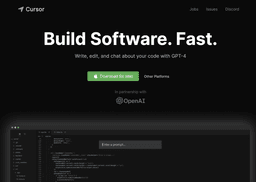
Cursor - The AI-first Code Editor
Cursor is an AI-powered code editor for efficient pair programming.
AI-firstCode EditorPair-programming
Introduction
Cursor is an AI-first code editor that is designed for pair-programming. It is an IDE of the future that helps developers build software faster with the power of AI.
Key Features
Pair-programming with AI
Chat with your project
Codebase-specific answers
Browsing documentation
Generating code
Fixing bugs
One-click migration
Local mode
Frequently Asked Questions
What is Cursor - The AI-first Code Editor?
How to use Cursor - The AI-first Code Editor?
Can I use the Cursor code editor for free?
Is my code stored on Cursor's servers?
Can Cursor help me generate code from scratch?
Does Cursor support migrating extensions from VSCode?
Similar Tools

CodeFast
Quickly learn coding to create successful online ventures with this app designed for fast-paced business growth. Start building today!

Genie AI
Experience a versatile AI chatbot capable of handling multiple tasks with ease. Engage with our multi-model application today!

DhiWise
Revolutionize your software development process with the Agentic AI platform - the ultimate tool for automating the software development lifecycle.
Use Cases
- Pair-programming
- Codebase navigation
- Code generation
- Bug fixing
How to Use
To use Cursor, simply download the editor for Mac and install it on your computer. Once installed, you can migrate all your favorite VSCode extensions with just one click. Cursor provides features like chat with your project, codebase-specific answers, browsing documentation, generating code, fixing bugs, and more. You can also keep your code local with the local mode to ensure security.