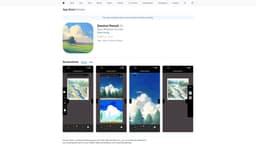
Introduction
Davinci Pencil is a tailored drawing app for iPad. You can unleash your creative ideas and draw your wildest fantasies onto canvas. Our easy-to-use interface simplifies your drawing experience, letting you imagine, draw, and paint in real-time.
Key Features
AI Rendering Feature with detailed configs
Draw overlay on top of rendered images
Draw side-by-side to compare between drawing and rendered images
View all images from your drawing
Create multiple pages
Select customized size for your paintings
Frequently Asked Questions
What is Davinci Pencil?
How to use Davinci Pencil?
Is Davinci Pencil available for other devices?
Does Davinci Pencil require a subscription?
Can I save and share my drawings?
Are there any privacy concerns with using Davinci Pencil?
Similar Tools

Genie AI
Experience a versatile AI chatbot capable of handling multiple tasks with ease. Engage with our multi-model application today!
Civitai green
Discover and share generative AI art and models on our platform dedicated to showcasing innovative and creative creations. Explore now!
Wan 2 AI
Turn your text into captivating videos using AI technology. Watch as your words come to life in stunning animations. Perfect for content creators and marketers.
Use Cases
- Unleash your creativity and draw anything you like
- Turn your wildest ideas and fantasies into beautiful paintings
- Enhance your drawing skills with AI technology
How to Use
To use Davinci Pencil, simply download the app from the App Store onto your iPad. Once installed, open the app and explore the various features available. Use your finger or a compatible stylus to draw and paint on the canvas. Take advantage of the AI rendering feature and other tools to enhance your drawings. Save and share your artwork to showcase your talent!