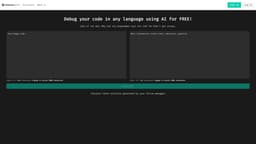
Debuggr.net
Debuggr.net is a free AI tool that finds and fixes bugs in code.
Introduction
Debuggr.net is a free AI debugger that helps you find bugs in your code. It uses artificial intelligence to analyze your code and provide solutions to fix any errors or issues.
What stands out?
AI debugger to find bugs in code
Support for debugging code in any language
Generated solutions by fellow debuggers
Joke of the day to lighten the mood
API documentation for integration
Stats to track debugging progress
Contact section to report issues
Frequently Asked Questions
What is Debuggr.net?
How to use Debuggr.net?
What programming languages does Debuggr.net support?
Can I use Debuggr.net to debug my software applications?
Is Debuggr.net a free service?
Can I report issues or provide feedback?
Reviews & Feedback
Share your experience with the community
0.0
Based on 0 reviews
User Comments (0)
Sort Criteria
Order
No reviews yet. Be the first to share your thoughts!
Statistics
Monthly visits
NaN
Saved by users
0
Rating
0.0/ 5.0
Added on
—
Similar Tools

Cursor
A cutting-edge code editor prioritizing AI technology for rapid software development. Boost your productivity with this innovative tool.

Anthropic
The AI assistant named Claude, called Anthropic, offers various capabilities and services.

Replit
Replit is a collaborative IDE featuring 50+ programming languages, a robust compiler, and interpreter. Work together seamlessly on coding projects.
Use Cases
- Debugging software applications
- Fixing coding errors or issues
- Improving code quality and efficiency
- Learning from generated solutions by fellow debuggers
How to Use
To use Debuggr.net, simply sign up or log in to your account. Then, you can upload your code in any programming language and let the AI debugger analyze it. The debugger will generate possible solutions to debug your code and provide recommendations to resolve any bugs or errors.