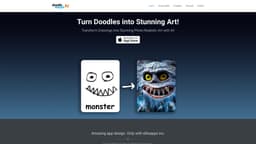
Doodle Morph AI
Transform doodles into stunning art with Doodle Morph AI.
AI art appphoto-realistic artdoodle transformation
Introduction
Doodle Morph AI is an app developed by ellisapps inc. that uses artificial intelligence to transform doodles into stunning, photo-realistic art.
Key Features
AI-powered doodle to photo-realistic art transformation
Customizable styles and parameters
High-quality output
Easy-to-use interface
Compatible with various formats
Advanced image processing
Real-time rendering
Frequently Asked Questions
What is Doodle Morph AI?
How to use Doodle Morph AI?
What is Doodle Morph AI?
How do I use Doodle Morph AI?
What customization options are available in Doodle Morph AI?
What are some use cases for Doodle Morph AI?
Is Doodle Morph AI compatible with different file formats?
Does Doodle Morph AI offer real-time rendering?
Similar Tools
Airtable Assistant
Easily create apps and analyze data with our AI tool, no coding required. Build and analyze without the hassle of programming.

ProjectAI
Discover programming through hands-on projects with detailed instructions. Step-by-step guidance for learning coding skills effectively.

MetaGPT (MGX)
Get access to 24/7 AI Teams for creating apps, games, PPTs, and analysis. Boost productivity with innovative tools at your fingertips.
Use Cases
- Creating visually stunning art from simple doodles or sketches
- Enhancing and transforming personal artwork
- Generating unique and captivating images for social media
- Converting hand-drawn illustrations into professional-looking graphics
- Adding artistic touch to photographs and images
How to Use
To use Doodle Morph AI, simply open the app and import a doodle or drawing. The AI algorithm will then analyze the input and generate a photo-realistic version of the artwork. Users can customize the style, colors, and other parameters to further enhance the output. The transformed art can be saved or shared with others.