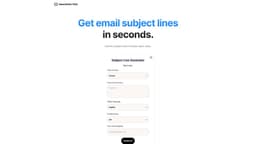
Subject Line Generator
Tailored subject lines with AI and Gmail integration.
Introduction
Our AI-powered Subject Line Generator creates options tailored to your message. Choose your tone and even add emojis. If you use Gmail, it seamlessly integrates into your inbox for convenience.
Frequently Asked Questions
What is Subject Line Generator?
How to use Subject Line Generator?
How does the AI generate subject lines?
Can I customize the generated subject lines?
Does the generator work with Gmail?
More Information
Subject Line Generator Company
Subject Line Generator Company name: Newsletter Pilot .
Subject Line Generator Youtube
Subject Line Generator Youtube Link: https://www.youtube.com/watch?v=PGswg4_yGAI&t=2s
Reviews & Feedback
Share your experience with the community
0.0
Based on 0 reviews
User Comments (0)
Sort Criteria
Order
No reviews yet. Be the first to share your thoughts!
Statistics
Monthly visits
NaN
Saved by users
0
Rating
0.0/ 5.0
Added on
—
Similar Tools

Airtable Assistant
Easily create apps and analyze data with our AI tool, no coding required. Build and analyze without the hassle of programming.

Grok
AI assistant that promotes truth and objectivity with various features.

NoteGPT
Summarize videos, articles, and text with AI. Chat with AI assistant. Transcript generator. Automated note-taking. Folder management.

PixAI - AI Art Generator
Create stunning anime art effortlessly.

DeepAI
AI tools for creative people.
How to Use
To use the Subject Line Generator, simply provide your message and desired tone. The AI will then generate multiple subject line options for you to choose from. You can also add emojis to make your subject lines more engaging. If you use Gmail, you can easily access and use the generator within your inbox.