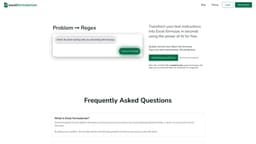
Formularizer - AI assistant for Excel, Google Sheets, and more
Formularizer is an AI platform that generates and explains formulas for various applications.
AI assistantExcelGoogle Sheets
Introduction
Formularizer is a powerful AI platform that helps users generate and explain formulas for Excel, Google Sheets, Notion, and more. It saves time and improves productivity by quickly converting ideas into formulas with the assistance of AI.
Key Features
Formula generation and explanation with AI
Support for Excel, Google Sheets, Notion, and more
Data privacy and security
Fast response time
High accuracy
User-friendly interface
Frequently Asked Questions
What is Formularizer - AI assistant for Excel, Google Sheets, and more?
How to use Formularizer - AI assistant for Excel, Google Sheets, and more?
What is Formularizer?
Is Formularizer free?
How does Formularizer work?
How to use Formularizer effectively?
Is my data safe?
Similar Tools

LimeChat
Revolutionize your e-commerce business with our AI-powered platform that offers support and marketing through WhatsApp. Boost sales and engagement now!

Plagiarism Remover
Eliminate plagiarism in your text with this free AI tool. Enhance your writing by rephrasing content effortlessly. Try it now!

iSlide
Simplify your PowerPoint design with our innovative platform, offering a wide range of templates and AI tools to enhance your presentations.
Use Cases
- Generating and explaining formulas for Excel, Google Sheets, and Notion
- Converting instructions into formulas for various formula formats
- Assisting with regular expression pattern generation and explanation
- Generating and explaining code for Excel VBA and Google Apps Script
How to Use
To use Formularizer, simply enter your problem or instruction, such as 'calculate the total sales of the first 12 months in column D' or 'make a cell yellow'. Formularizer will then generate and explain the corresponding formula or solution for you. The platform supports various formula formats, including Excel, Google Sheets, Notion, regular expressions, Excel VBA, and Google Apps Script.