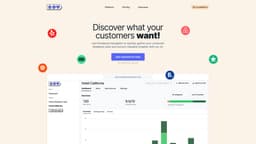
Feedback Navigator AI
AI-driven user feedback organization and analysis
Introduction
Feedback Navigator AI is a platform that allows business owners, property managers, product teams, consultants, and other users to organize, analyze, and extract valuable insights from user feedback data with the help of artificial intelligence and built-in data sources.
What stands out?
Organize and analyze user feedback with AI
Built-in data sources for feedback extraction
Custom category detection and sentiment analysis
Request detection and custom workflows
CSV export for custom analysis
Frequently Asked Questions
What is Feedback Navigator AI?
How to use Feedback Navigator AI?
Is a credit card required for the free trial?
What data sources does Feedback Navigator AI support?
Can I export the analyzed feedback data?
More Information
Feedback Navigator AI Support Email & Customer service contact & Refund contact etc.
Here is the Feedback Navigator AI support email for customer service: [email protected] .
Feedback Navigator AI Pricing
Feedback Navigator AI Pricing Link: https://www.feedbacknavigator.com/#pricing
Reviews & Feedback
Share your experience with the community
0.0
Based on 0 reviews
User Comments (0)
Sort Criteria
Order
No reviews yet. Be the first to share your thoughts!
Statistics
Monthly visits
NaN
Saved by users
0
Rating
0.0/ 5.0
Added on
—
Similar Tools
Use Cases
- Property Managers: Analyze guest reviews and automate scraping of platforms
- Gym Owners: Assess reviews across multiple gyms and automate scraping of platforms
- Product Teams: Centralize and automate the categorization of customer feedback
- Hotel Managers: Analyze new reviews and automate scraping of platforms
- Consultants: Provide actionable insights into clients' customers' experiences
- Restaurant Owners: Evaluate restaurant reviews across multiple locations and automate scraping of platforms
How to Use
To use Feedback Navigator AI, users can quickly gather customer feedback data and extract valuable insights with AI. They can pull in feedback from platforms like Trustpilot, Booking.com, and Yelp, upload a CSV file, or use the API. The platform also allows users to define custom categories, use sentiment analysis, detect requests, create custom workflows, and export data for custom analysis or visualization.