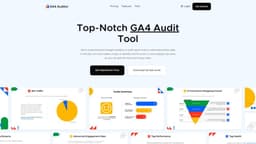
GA4 Auditor - Google Analytics 4 Audit Tool
GA4 Auditor is a tool to audit Google Analytics data for accuracy and quality in minutes.
Introduction
GA4 Auditor is an automated Google Analytics 4 audit tool that provides a comprehensive analytics audit report with actionable insights in just minutes. It helps users verify the accuracy and quality of their Google Analytics data.
What stands out?
The core features of GA4 Auditor include: 1. Tag Health & Performance: Checks if GA4 tags are firing correctly, identifies duplicate tags, and assesses loading times. 2. Data Integrity & Quality: Analyzes data for issues such as missing data, duplication, discrepancies, bot traffic, spam, and sampling errors. 3. Implementation Best Practices: Provides recommendations for optimizing GA4 setup and utilizing data effectively for marketing and business decisions. 4. Actionable Plan: Offers a clear plan for fixing potential issues and ensuring a smooth GA4 migration. 5. Save Time & Money: Automates the auditing process, reducing manual checks and the need for external consultants. 6. Tailored Reporting Options: Allows customization of reports in terms of language, theme, and file format.
Frequently Asked Questions
What is GA4 Auditor - Google Analytics 4 Audit Tool?
How to use GA4 Auditor - Google Analytics 4 Audit Tool?
More Information
GA4 Auditor - Google Analytics 4 Audit Tool Support Email & Customer service contact & Refund contact etc.
Here is the GA4 Auditor - Google Analytics 4 Audit Tool support email for customer service: [email protected] .
GA4 Auditor - Google Analytics 4 Audit Tool Company
GA4 Auditor - Google Analytics 4 Audit Tool Company name: Optimization Up .
GA4 Auditor - Google Analytics 4 Audit Tool Login
GA4 Auditor - Google Analytics 4 Audit Tool Login Link: https://app.ga4auditor.com/auth/signin
GA4 Auditor - Google Analytics 4 Audit Tool Sign up
GA4 Auditor - Google Analytics 4 Audit Tool Sign up Link: https://app.ga4auditor.com/auth/signup
GA4 Auditor - Google Analytics 4 Audit Tool Pricing
GA4 Auditor - Google Analytics 4 Audit Tool Pricing Link: https://www.ga4auditor.com/#pricing
GA4 Auditor - Google Analytics 4 Audit Tool Facebook
GA4 Auditor - Google Analytics 4 Audit Tool Facebook Link: https://www.facebook.com/ga4auditor/
GA4 Auditor - Google Analytics 4 Audit Tool Youtube
GA4 Auditor - Google Analytics 4 Audit Tool Youtube Link: https://www.youtube.com/@ga4auditor
GA4 Auditor - Google Analytics 4 Audit Tool Linkedin
GA4 Auditor - Google Analytics 4 Audit Tool Linkedin Link: https://www.linkedin.com/company/ga4auditor/
GA4 Auditor - Google Analytics 4 Audit Tool Twitter
GA4 Auditor - Google Analytics 4 Audit Tool Twitter Link: https://twitter.com/ga4auditor
Reviews & Feedback
Share your experience with the community
0.0
Based on 0 reviews
User Comments (0)
Sort Criteria
Order
No reviews yet. Be the first to share your thoughts!
Statistics
Monthly visits
NaN
Saved by users
0
Rating
0.0/ 5.0
Added on
—
Similar Tools

Clipto
Elevate your transcription game with our cutting-edge AI service for converting audio, video, and YouTube files into text. Try it now!

Prolific
Find reliable research participants quickly with Trustworthy research participants in minutes app. Get trustworthy participants for your study fast.
hCaptcha
Enterprise-grade AI security platform protecting against bots and human abuse.

Branded
Discover a platform providing genuine consumer data and insights for your business needs.

Adobe
Leading company providing creative, marketing, and document management solutions.
Use Cases
- GA4 Auditor can be beneficial for the following use cases: 1. Brands: Ensuring accurate and high-quality data for GA4 implementation, avoiding incorrect decisions based on inaccurate data, and optimizing marketing and business decisions. 2. Agencies: Managing multiple client accounts, saving time through automation, and building trust with clients through white-labeled audit reports. 3. Enterprises: Tailored solutions for custom GA4 auditing needs.
How to Use
To use GA4 Auditor, simply follow these steps: 1. Connect your Google Analytics 4 account to the tool and select the property you want to audit. 2. Customize the report according to your preferences, including language, theme, and file format. 3. Download the customized audit report, which provides actionable insights for improving your GA4 implementation.