GetProspect
LinkedIn email finder tool for extracting and verifying email addresses.
Introduction
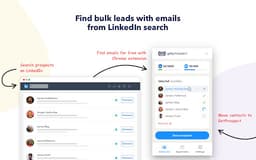
GetProspect is a LinkedIn email finder tool that allows users to extract and verify business email addresses from LinkedIn profiles quickly and efficiently. It provides features for both individual email lookups and bulk email extraction, making it ideal for sales teams, marketers, and recruiters.
What stands out?
Email finder for LinkedIn connections
Bulk email extraction
Email verification free of charge
CRM contact management
Integration with sales tools
Frequently Asked Questions
What is GetProspect?
How to use GetProspect?
Can I use GetProspect email finder extension for free?
How to find email addresses on LinkedIn?
Can I find email address owner with GetProspect?
How can I use email extractor software for business?
Can I extract emails from websites by GetProspect?
Which payment methods can I use for GetProspect subscription?
How to cancel my email finder subscription?
More Information
GetProspect Support Email & Customer service contact & Refund contact etc.
More Contact, visit the contact us page(https://www.getprospect.com/features/support)
GetProspect Company
GetProspect Company name: . GetProspect Company address: . More about GetProspect, Please visit the about us page(https://www.getprospect.com/about).
GetProspect Login
GetProspect Login Link: https://app.getprospect.com/login?lang=en
GetProspect Sign up
GetProspect Sign up Link: https://www.getprospect.com/start-free
GetProspect Pricing
GetProspect Pricing Link: https://www.getprospect.com/pricing
GetProspect Facebook
GetProspect Facebook Link: https://www.facebook.com/getprospect
GetProspect Youtube
GetProspect Youtube Link: https://www.youtube.com/user/getprospect
GetProspect Linkedin
GetProspect Linkedin Link: https://www.linkedin.com/company/getprospect
GetProspect Instagram
GetProspect Instagram Link: https://www.instagram.com/getprospect
GetProspect Pinterest
GetProspect Pinterest Link: https://www.pinterest.com/getprospect
Reviews & Feedback
Share your experience with the community
0.0
Based on 0 reviews
User Comments (0)
Sort Criteria
Order
No reviews yet. Be the first to share your thoughts!
Statistics
Monthly visits
NaN
Saved by users
0
Rating
0.0/ 5.0
Added on
—
Similar Tools

Use Cases
- Extract email addresses quickly from LinkedIn profiles
- Bulk save email addresses from LinkedIn searches
How to Use
To use GetProspect, install the Chrome extension. Visit a LinkedIn profile and click the 'Get email' button, or search profiles and click 'Select all' to save multiple email addresses.