ChatGPT Hotkeys - Chrome Extension
Hotkeys extension for efficient ChatGPT usage.
ChatGPTHotkeysKeyboard shortcuts
Introduction
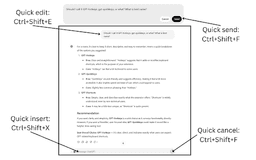
ChatGPT Hotkeys is an extension designed to enhance keyboard efficiency while using ChatGPT. It provides a set of useful hotkeys for editing, sending, and canceling messages, streamlining user interaction by minimizing mouse movements. This tool significantly improves the user experience by enabling faster access to previous responses and seamless navigation within the chat interface.
Key Features
Useful hotkeys for editing, sending, and canceling messages
Bloat-free shortcuts
Enhanced keyboard efficiency
Frequently Asked Questions
What is ChatGPT Hotkeys?
How to use ChatGPT Hotkeys?
What are the benefits of using ChatGPT Hotkeys?
Is it difficult to remember all the hotkeys?
Similar Tools

LimeChat
Revolutionize your e-commerce business with our AI-powered platform that offers support and marketing through WhatsApp. Boost sales and engagement now!

Plagiarism Remover
Eliminate plagiarism in your text with this free AI tool. Enhance your writing by rephrasing content effortlessly. Try it now!

iSlide
Simplify your PowerPoint design with our innovative platform, offering a wide range of templates and AI tools to enhance your presentations.
Use Cases
- Quickly edit and send messages using shortcuts
- Efficiently scroll through previous responses without mouse movement
How to Use
To use the ChatGPT Hotkeys, simply install the extension and utilize the designated keyboard shortcuts for various actions like editing, sending, and canceling messages while chatting with ChatGPT.