Gemini API Video Search - Chrome Extension
Search YouTube video frames using text inputs.
Introduction
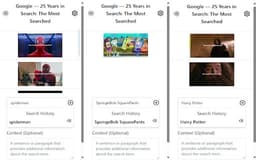
Gemini API Video Search is an extension that allows users to search YouTube video frames using text. It utilizes generative AI models to analyze video content and retrieve specific frames based on textual input. It's important to note that the extension is limited to searching a reduced number of frames within a video, and users should always verify the results, as generative AI can make errors.
What stands out?
Text-based video frame search
Generative AI processing
Limitations on frame retrieval
Frequently Asked Questions
What is Gemini API Video Search?
How to use Gemini API Video Search?
Can I search all frames in a YouTube video?
What should I do if the search results seem incorrect?
Reviews & Feedback
Share your experience with the community
0.0
Based on 0 reviews
User Comments (0)
Sort Criteria
Order
No reviews yet. Be the first to share your thoughts!
Statistics
Monthly visits
NaN
Saved by users
0
Rating
0.0/ 5.0
Added on
—
Use Cases
- Finding specific moments in YouTube videos using text.
How to Use
To use Gemini API Video Search, input the desired text in the search bar, and the extension will scan the relevant YouTube video frames to find matches based on your text.