IconifyAI.com
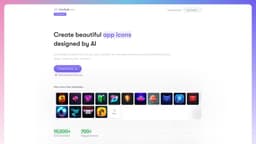
IconifyAI.com is an AI-powered app icon generator that creates unique icons in seconds.
Introduction
IconifyAI.com is an AI-powered app icon generator that allows users to create unique, beautiful, and professional app icons in seconds. With the help of AI, users can convert text to ready-to-use logos effortlessly.
What stands out?
The core features of IconifyAI.com include: - AI-powered icon generation trained on a vast library of graphics, icons, and assets - Automated color palette generation based on selected graphics or brand colors - Previewing and downloading generated icons in high-definition - Copying icons as images for easy sharing - Wide variety of distinguished icon styles to choose from - Full ownership of the generated icons, including selling rights and copyright - 100% satisfaction guarantee with the option for a refund if not satisfied
Frequently Asked Questions
What is IconifyAI.com?
How to use IconifyAI.com?
How long does the design process take?
How much does it cost?
Can I create multiple icon designs?
What do I receive after generating an icon?
Can I use the generated icon for commercial purposes?
More Information
IconifyAI.com Support Email & Customer service contact & Refund contact etc.
Here is the IconifyAI.com support email for customer service: [email protected] .
IconifyAI.com Pricing
IconifyAI.com Pricing Link: https://www.iconifyai.com/#pricing
Reviews & Feedback
Share your experience with the community
0.0
Based on 0 reviews
User Comments (0)
Sort Criteria
Order
No reviews yet. Be the first to share your thoughts!
Statistics
Monthly visits
NaN
Saved by users
0
Rating
0.0/ 5.0
Added on
—
Use Cases
- IconifyAI.com can be used for various purposes, including: - Creating app icons for mobile applications - Designing logos for websites or brands - Generating unique icons for social media profiles - Customizing icons for user interfaces - Designing visual elements for presentations or marketing materials
How to Use
To use IconifyAI.com, simply follow these steps: 1. Specify the objects you want to see in your icons by providing short and clear descriptions. 2. Select the color that best represents your app. 3. Choose your preferred style from options like metallic, textured, pixelated, clay, and gradient. 4. Specify the number of icons you need. 5. Generate the icons. 6. Preview the generated icons and download them in high-definition quality. 7. Alternatively, copy the icon as an image to easily share it.