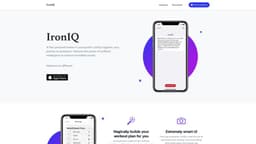
IronIQ
An AI-powered fitness app, IronIQ, assists individuals to achieve remarkable fitness goals.
Introduction
IronIQ is a free personal trainer app that utilizes artificial intelligence to support individuals in their fitness journey and help them achieve incredible results.
What stands out?
Magically builds personalized workout plans using AI technology
Extremely smart and user-friendly UI for easy navigation
Unlimited backups of workouts synced to iCloud
Effortlessly share workouts with others
Track your progress and celebrate achievements
Frequently Asked Questions
What is IronIQ?
How to use IronIQ?
Is IronIQ available for both iOS and Android?
Can IronIQ generate nutrition plans as well?
Can I use IronIQ without an internet connection?
Is IronIQ suitable for advanced weightlifters?
What if I accidentally delete a workout?
More Information
IronIQ Company
IronIQ Company name: IronIQ LLC . More about IronIQ, Please visit the about us page(https://ironiq.app/#about).
Reviews & Feedback
Share your experience with the community
0.0
Based on 0 reviews
User Comments (0)
Sort Criteria
Order
No reviews yet. Be the first to share your thoughts!
Statistics
Monthly visits
NaN
Saved by users
0
Rating
0.0/ 5.0
Added on
—
Use Cases
- Individuals seeking a personalized workout plan without any prior experience
- Fitness enthusiasts at all levels looking for a powerful and intuitive tracking app
- Gym-goers who want to easily share workout routines with friends or coaches
- Anyone who wants to accurately track their fitness progress and celebrate milestones
How to Use
To use IronIQ, simply download the app from the provided link. Once installed, create an account and start by setting up your workout goals. IronIQ's AI will then magically build a personalized workout plan for you, eliminating the need for any prior experience. The app features a smart UI that maximizes efficiency and provides a seamless workout tracking experience. You can easily share your workouts with gym buddies or coaches, and all your data is securely backed up to iCloud.