JDoodle - Chrome Extension
Execute code from any webpage with 1 click.
Introduction
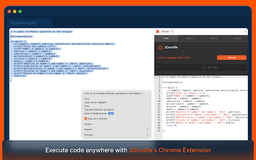
With the JDoodle Chrome Extension, just select and right-click to execute any program right from the web.
What stands out?
Supports 85+ Languages
AI-Powered Language Detection (JDroid)
Debug with JDroid
One-Click Execution
Execution History Tracking
Frequently Asked Questions
What is JDoodle?
How to use JDoodle?
What can I do with the JDoodle Chrome Extension?
How do I use the extension?
Can I debug code with JDoodle?
Is the extension free to use?
What programming languages are supported?
Reviews & Feedback
Share your experience with the community
0.0
Based on 0 reviews
User Comments (0)
Sort Criteria
Order
No reviews yet. Be the first to share your thoughts!
Statistics
Monthly visits
NaN
Saved by users
0
Rating
0.0/ 5.0
Added on
—

Use Cases
- Execute programs within the extension
- Manage and view execution history
- Access JDoodle.com for more features
- Securely log out as needed
How to Use
Select code on a webpage, right-click, and execute directly with JDoodle. Alternatively, open code in the JDoodle extension with a simple right-click.