Latitude
A data workspace for streamlined data analysis.
Introduction
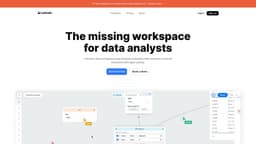
Latitude is a data workspace that helps analysts streamline their workflow and build interactive data apps quickly.
What stands out?
Connect data sources easily
Streamline workflow from raw data to final report
Infinite collaborative canvas for sources, transformations, and charts
Data snapshots with high-speed querying capabilities
Data profiler for quick data quality assessment
Built-in AI assistant to generate SQL queries
Create beautiful interactive data apps
Chart annotations for collaboration
Integration with dbt projects
Frequently Asked Questions
What is Latitude?
How to use Latitude?
What is Latitude?
How do I use Latitude?
What are the core features of Latitude?
What are some use cases of Latitude?
Is there a free trial available?
More Information
Latitude Company
Latitude Company name: Latitude .
Latitude Youtube
Latitude Youtube Link: https://www.youtube.com/watch?v=8BH9kyje3-A
Latitude Linkedin
Latitude Linkedin Link: https://www.linkedin.com/company/trylatitude/
Latitude Twitter
Latitude Twitter Link: http://twitter.com/trylatitude
Latitude Github
Latitude Github Link: https://github.com/latitude-dev/latitude-sdk
Reviews & Feedback
Share your experience with the community
0.0
Based on 0 reviews
User Comments (0)
Sort Criteria
Order
No reviews yet. Be the first to share your thoughts!
Statistics
Monthly visits
NaN
Saved by users
0
Rating
0.0/ 5.0
Added on
—
Similar Tools

Pixelcut
Easily create stunning product photos and ads with our free online design tool. Remove backgrounds and erase objects effortlessly.

Wondershare
Discover innovative tools for enhancing creativity, productivity, and efficiency with our app. Unleash your potential today!

TurboScribe
Unlimited AI transcription with 99.8% accuracy in 98+ languages.

GirlfriendGPT - The AI Companion Chatroom
An uncensored AI companion chatroom for SFW and NSFW conversations.
Gamma App
Gamma App is an AI-powered tool that creates stunning presentations, webpages, and documents effortlessly.
Use Cases
- Streamline data analysis
- Build interactive data apps
- Generate insights
- Collaborate with team members
- Enhance data workflow efficiency
How to Use
Connect your data sources, model and analyze the data, build stunning dashboards and reports, collaborate with others, and generate insights.