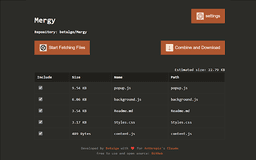
Mergy - Chrome Extension
A GitHub extension for combining and optimizing code files for Claude AI.
Introduction
Mergy is a browser extension that facilitates working with GitHub repositories for Claude AI. It enables file fetching, combination, and optimization for AI processing, making it easier for developers to provide context about codebases.
What stands out?
Fetch files from public GitHub repositories
Combine selected files into a single document
Optimize content for AI processing
Customizable file inclusion/exclusion rules
Respect for .gitignore rules
User-friendly interface with file size estimates
Frequently Asked Questions
What is Mergy?
How to use Mergy?
Do I need a GitHub Personal Access Token to use Mergy?
What types of repositories can I use Mergy with?
Reviews & Feedback
Share your experience with the community
0.0
Based on 0 reviews
User Comments (0)
Sort Criteria
Order
No reviews yet. Be the first to share your thoughts!
Statistics
Monthly visits
NaN
Saved by users
0
Rating
0.0/ 5.0
Added on
—
Similar Tools


Use Cases
- Streamline AI-assisted programming tasks on small to medium-sized libraries.
How to Use
To use Mergy, visit a GitHub repository, click the Mergy icon, configure settings, select files to include, and download the combined file for upload to Claude Projects.