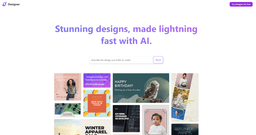
Microsoft Designer
Create stunning designs with Microsoft Designer app for social media, invitations, and more.
graphic designappsocial media
Introduction
Microsoft Designer is a graphic design app that allows users to create stunning and professional-quality designs for social media posts, invitations, digital postcards, graphics, and more.
Key Features
Creation of professional quality designs
Wide range of templates
Customizable text and image options
Easy sharing and downloading
Frequently Asked Questions
What is Microsoft Designer?
How to use Microsoft Designer?
What types of designs can I create with Microsoft Designer?
Can I customize the designs?
How can I share or download my designs?
Is Microsoft Designer suitable for professional use?
Similar Tools

Gallabox
Elevate your business communication with our No-code WhatsApp automation tool. Streamline processes and engage customers effortlessly.

LimeChat
Revolutionize your e-commerce business with our AI-powered platform that offers support and marketing through WhatsApp. Boost sales and engagement now!

Gethookd
Revolutionize your ad creation and performance with our AI platform. Optimize your ads like never before for maximum results.
Use Cases
- Creating attention-grabbing social media posts
- Designing beautiful invitations and digital postcards
- Producing high-quality graphic designs for various purposes
How to Use
To use Microsoft Designer, simply start with your idea and use the intuitive tools and features to bring your vision to life. Choose from a wide range of templates, customize them with your own text and images, and then easily share or download your designs.