NavCHAT - Chrome Extension
AI-powered browsing assistant
Introduction
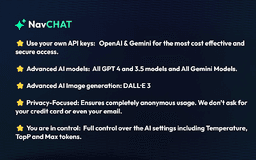
NavCHAT is a cutting-edge Chrome extension that integrates advanced OpenAI and Gemini technology to revolutionize browsing experience. It allows users to analyze files, create screenshots, and ask questions about the web within the same browser window.
What stands out?
Use of OpenAI & Gemini API keys
Advanced AI models including GPT-3, GPT-4, Gemini 1.5 Pro/Flash
Privacy-focused with anonymous usage
Full control over AI settings
Frequently Asked Questions
What is NavCHAT?
How to use NavCHAT?
What API keys does NavCHAT support?
Is my usage of NavCHAT private and secure?
Reviews & Feedback
Share your experience with the community
0.0
Based on 0 reviews
User Comments (0)
Sort Criteria
Order
No reviews yet. Be the first to share your thoughts!
Statistics
Monthly visits
NaN
Saved by users
0
Rating
0.0/ 5.0
Added on
—
Similar Tools
AI Search Engine of Pathofexile 2 -poe2db
Poe2db.org Pathofexile 2 Search Engine,News & Guides & Wiki
MidJourney
AI platform for creating and exploring images with community input.
Semantic Scholar
Discover relevant scientific literature with Semantic Scholar, a free AI research tool that helps scholars find the information they need.
OpenAI
OpenAI creates safe AGI for humanity through research and advanced models.
Midjourney
Research lab expanding human imagination
Use Cases
- Academic research for students and teachers
- Content creation for marketers, bloggers, and artists
- Professional assistance for tasks like emails and memos
- Endless use cases for hobbyists, tech enthusiasts, and web explorers
How to Use
To use NavCHAT, simply install the Chrome extension, set up your own API keys, and start browsing. You can access advanced AI features and interact with the web seamlessly.