NocodeCMS
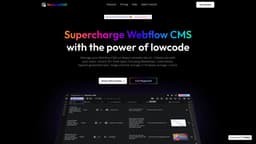
NocodeCMS is a platform for managing Webflow CMS with an easy-to-use interface.
Introduction
NocodeCMS is a platform that allows you to manage your Webflow CMS on an Airtable-like user interface (UI). It provides unlimited editors for free and offers features such as AI-generated content, direct publishing of images to your Webflow CMS and website, and collaboration with your team.
What stands out?
Manage Webflow CMS data on an Airtable-like UI
Collaborate with unlimited editors for free
35+ field types including Markdown, Code blocks, and OpenAI generated text
Image and File storage in Firebase storage
Flexible and extensible cloud functions using code
Frequently Asked Questions
What is NocodeCMS?
How to use NocodeCMS?
Can I collaborate with my team using NocodeCMS?
What are the core features of NocodeCMS?
Can I integrate NocodeCMS with external services?
Is NocodeCMS free to use?
Reviews & Feedback
Share your experience with the community
0.0
Based on 0 reviews
User Comments (0)
Sort Criteria
Order
No reviews yet. Be the first to share your thoughts!
Statistics
Monthly visits
NaN
Saved by users
0
Rating
0.0/ 5.0
Added on
—
Similar Tools

Pixelcut
Easily create stunning product photos and ads with our free online design tool. Remove backgrounds and erase objects effortlessly.

Wondershare
Discover innovative tools for enhancing creativity, productivity, and efficiency with our app. Unleash your potential today!

TurboScribe
Unlimited AI transcription with 99.8% accuracy in 98+ languages.

Intercom
Get quicker solutions with Automation and human assistance. Enhance support efficiency for faster issue resolutions.

Alpha3D
Transform 2D images into 3D assets with generative AI.
Use Cases
- Optimizing Webflow CMS management and collaboration
- Enhancing Webflow CMS with AI-generated content
- Publishing images directly to Webflow CMS and website
- Automating CMS workflows with flexible cloud functions
How to Use
To use NocodeCMS, you need to follow these steps: 1. Connect Rowy table to Webflow CMS with your API key. 2. Add the Webflow CMS Collection ID to integrate your CMS data. 3. Manage your Webflow CMS data using the Rowy table UI. You can also try NocodeCMS on a live playground to experience its features firsthand.