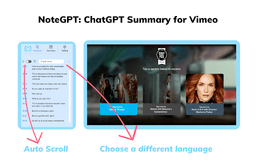
Vimeo Summary Generator - Chrome Extension
Efficient learning with AI summaries.
Video SummarizerAI-PoweredChrome Extension
Introduction
An AI-powered video summarizer Chrome extension designed for efficient learning through Vimeo.
Key Features
AI Summarization
Automated Timestamps
Auto-Scrolling Transcripts
Copy Features
Customizable Settings
Frequently Asked Questions
What is Vimeo Summary Generator?
How to use Vimeo Summary Generator?
What is ChatGPT?
What is a video summary?
Do I need an OpenAI account?
Similar Tools

Plagiarism Remover
Eliminate plagiarism in your text with this free AI tool. Enhance your writing by rephrasing content effortlessly. Try it now!

Parafrasear Textos
Enhance the quality of your text with our online tool for paraphrasing. Improve readability and make your content stand out.
AI Drive
Experience the convenience of AI Drive, the app that utilizes artificial intelligence to enhance your driving experience. Say goodbye to manual control!
Use Cases
- Save time by quickly summarizing videos
- Efficiently navigate through video transcripts
- Personalize and save transcripts, summaries, and notes
How to Use
1. Visit Vimeo website. 2. Select a video of interest. 3. Click 'Transcript & summary' button to view subtitles and summaries. 4. Click 'View Summary with AI' if logged into chat.openai.com. 5. Use the 'Copy' icon to save summaries.