Octo Analytics - Chrome Extension
AI analytics tool for Google Sheets data
Introduction
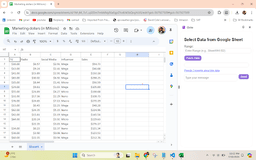
Octo Analytics is a powerful AI analytics tool integrated with Google Sheets to provide instant data insights using natural language processing. It simplifies data analysis processes for Marketing, Product, and Finance data without leaving the Google Sheets environment.
What stands out?
Instant data insights with natural language processing
User-friendly side panel for valuable insights
Data analysis within Google Sheets
Frequently Asked Questions
What is Octo Analytics?
How to use Octo Analytics?
Is Octo Analytics free to use?
Can Octo Analytics analyze data from different sources?
Reviews & Feedback
Share your experience with the community
0.0
Based on 0 reviews
User Comments (0)
Sort Criteria
Order
No reviews yet. Be the first to share your thoughts!
Statistics
Monthly visits
NaN
Saved by users
0
Rating
0.0/ 5.0
Added on
—
Use Cases
- Analyzing Marketing data for campaign performance
- Analyzing Product data for feature optimization
- Analyzing Finance data for budget tracking
How to Use
To use Octo Analytics, install the Chrome extension, click on the Octo icon, fill in your email for the free trial, confirm it, then start analyzing data within Google Sheets by adding data ranges and asking questions for insights.