Offline Chat with AI - Chrome Extension
Browser extension for AI chatbot interaction
Browser extensionAI chatbotGemini Nano AI engine
Introduction
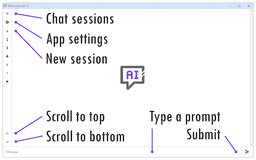
Offline Chat with AI is a browser extension that allows users to interact with the Gemini Nano AI chatbot in offline mode.
Key Features
Interact with AI chatbot in offline mode
User-friendly interface
Frequently Asked Questions
What is Offline Chat with AI?
How to use Offline Chat with AI?
How can I enable the Gemini Nano AI engine in Chrome browser?
What should I do if the 'Optimization Guide On Device Model' is not visible in Chrome components?
Similar Tools

Gallabox
Elevate your business communication with our No-code WhatsApp automation tool. Streamline processes and engage customers effortlessly.

LimeChat
Revolutionize your e-commerce business with our AI-powered platform that offers support and marketing through WhatsApp. Boost sales and engagement now!
Pronounce
Enhance your English pronunciation and communication skills with our AI speech checker app. Perfect your spoken English today!
Use Cases
- Engage in chat conversations with the Gemini Nano AI engine offline
- Access AI chatbot conveniently through browser extension
How to Use
To use Offline Chat with AI, install Chrome Canary or a compatible Chromium-based browser, enable AI settings, restart the browser, and check for updates.