ChatGPT Text Selection Extension - Chrome Extension
Open selected text in ChatGPT with a customized prompt.
Introduction
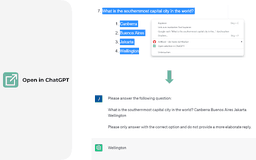
ChatGPT Text Selection Extension allows you to open selected text directly in ChatGPT with a customized prompt.
What stands out?
Open selected text directly in ChatGPT
Customize ChatGPT's behavior with a pre-filled prompt
Quick and easy access to ChatGPT
Frequently Asked Questions
What is ChatGPT Text Selection Extension?
How to use ChatGPT Text Selection Extension?
How do I install the ChatGPT Text Selection Extension?
Can I customize the prompt used in ChatGPT?
Are there any limitations to the selected text length?
Is ChatGPT Text Selection Extension available for other web browsers?
Reviews & Feedback
Share your experience with the community
0.0
Based on 0 reviews
User Comments (0)
Sort Criteria
Order
No reviews yet. Be the first to share your thoughts!
Statistics
Monthly visits
NaN
Saved by users
0
Rating
0.0/ 5.0
Added on
—

Use Cases
- Generating contextual responses to selected text
- Exploring different perspectives and insights
- Extracting information and summarizing content
How to Use
To use the ChatGPT Text Selection Extension, simply right-click on any selected text and choose the 'Open in ChatGPT' option from the context menu.