Optiwise.ai - Chrome Extension
Ecommerce analytics and insights tool
Introduction
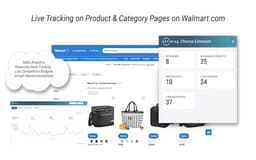
Optiwise.ai is an eCommerce data analytics tool that assists brands and retailers in making data-driven decisions for business growth with actionable insights and recommendations. The Optiwise.ai Chrome Extension supports Walmart Marketplace, providing product details and analytics without the need to switch between pages.
What stands out?
One-click Listing Optimization
Personalized Growth Recommendations using Generative AI
Rich Media (EBC)
Cross-Marketplace Intelligence
Competitive Analysis
Performance Reports
Keyword Rank Tracking
Paid Advertising Expertise
Frequently Asked Questions
What is Optiwise.ai?
How to use Optiwise.ai?
Is the Chrome Extension free to use?
Reviews & Feedback
Share your experience with the community
0.0
Based on 0 reviews
User Comments (0)
Sort Criteria
Order
No reviews yet. Be the first to share your thoughts!
Statistics
Monthly visits
NaN
Saved by users
0
Rating
0.0/ 5.0
Added on
—
Similar Tools

Pixelcut
Easily create stunning product photos and ads with our free online design tool. Remove backgrounds and erase objects effortlessly.

Wondershare
Discover innovative tools for enhancing creativity, productivity, and efficiency with our app. Unleash your potential today!

TurboScribe
Unlimited AI transcription with 99.8% accuracy in 98+ languages.

Intercom
Get quicker solutions with Automation and human assistance. Enhance support efficiency for faster issue resolutions.

Alpha3D
Transform 2D images into 3D assets with generative AI.
Use Cases
- Get a 360-degree view of products and performance analytics on Walmart Marketplace
- Track competitor products
- Identify trends among sponsored and discounted products
- Boost website traffic with personalized recommendations
- Analyze competitor keywords through the keyword cloud
- Edit product details directly from the Chrome Extension
How to Use
Install the Optiwise.ai Chrome Extension for Walmart Marketplace for free. Access product insights, competitor tracking, trends analysis, personalized recommendations, and more with just a click.