Introduction
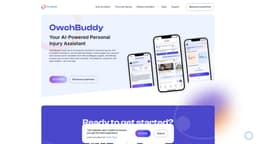
OwchBuddy is your go-to AI-powered assistant for personal injuries. Get immediate assistance, connect with top lawyers, and navigate your recovery with tailored advice. Available 24/7 with multilingual support, OwchBuddy ensures you are never alone post-accident. Consultations, resources, and legal insights - all in one app.
Key Features
Tailored Recommendations
Psychological Support
Centralized Document Storage
Educational Modules
Geographic Navigation
Feedback & Recommendations
Voice Command Feature
Frequently Asked Questions
What is OwchBuddy?
How to use OwchBuddy?
Similar Tools

Gallabox
Elevate your business communication with our No-code WhatsApp automation tool. Streamline processes and engage customers effortlessly.

LimeChat
Revolutionize your e-commerce business with our AI-powered platform that offers support and marketing through WhatsApp. Boost sales and engagement now!

Pronounce
Enhance your English pronunciation and communication skills with our AI speech checker app. Perfect your spoken English today!
How to Use
1. Download and Install: First, download the OwchBuddy app from the Google Play Store or Apple App Store, depending on your device. 2. Create an Account: Upon opening the app, you'll be prompted to create an account. This may involve providing some personal information and setting up login credentials. 3. Navigate the Interface: Once logged in, familiarize yourself with the app’s interface. OwchBuddy is designed to be user-friendly, with clear menus and options. 4. Seek Assistance: If you need legal, medical, or psychological help, navigate to the appropriate section of the app. You can input your issue, and the app will connect you to the relevant professional. 5. Use AI Features: Utilize the AI-driven features, such as chatbots or automated advice, to receive immediate assistance or guidance for your situation. 6. Schedule Appointments: If your issue requires direct human intervention, the app can help schedule appointments with specialists. 7. Access Resources: OwchBuddy often provides additional resources, such as articles, guides, and tips related to legal, medical, and psychological issues. 8. Manage Your Profile: You can manage your profile and customize settings to better suit your needs and preferences within the app. 9. Stay Secure: Always ensure that your personal data is protected by managing your privacy settings and understanding the app’s security measures.