PDF.ai
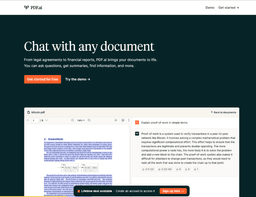
Summary: PDF.ai is a ChatPDF app that enables users to chat with PDFs, ask questions, get summaries, and find information easily.
Introduction
PDF.ai is an ultimate ChatPDF app that allows users to chat with any PDF document. It provides the ability to ask questions, obtain summaries, and easily find any information needed.
What stands out?
Chat with PDF documents
Ask questions about PDF content
Obtain summaries of PDF documents
Efficiently search for desired information in PDFs
Frequently Asked Questions
What is PDF.ai?
How to use PDF.ai?
What types of PDF documents are supported?
Can I chat with multiple PDFs simultaneously?
How accurate are the summaries provided by PDF.ai?
Is there a limit on the number of questions I can ask per PDF?
Can I download the PDF document after chatting with it?
More Information
PDF.ai Login
PDF.ai Login Link: https://pdf.ai/auth/sign-in
PDF.ai Sign up
PDF.ai Sign up Link: https://pdf.ai/auth/sign-in
PDF.ai Pricing
PDF.ai Pricing Link: https://pdf.ai/pricing
PDF.ai Youtube
PDF.ai Youtube Link: https://www.youtube.com/@pdfai
PDF.ai Tiktok
PDF.ai Tiktok Link: https://www.tiktok.com/@pdfai
PDF.ai Twitter
PDF.ai Twitter Link: https://twitter.com/pdfdotai
PDF.ai Instagram
PDF.ai Instagram Link: https://www.instagram.com/pdfdotai/
Reviews & Feedback
Share your experience with the community
0.0
Based on 0 reviews
User Comments (0)
Sort Criteria
Order
No reviews yet. Be the first to share your thoughts!
Statistics
Monthly visits
NaN
Saved by users
0
Rating
0.0/ 5.0
Added on
—
Use Cases
- Students can use PDF.ai to quickly find answers to questions or obtain summaries of assigned reading materials.
- Professionals can use PDF.ai to search for specific information in large documents or ask questions to clarify any doubts.
- Researchers can use PDF.ai to extract key information and summaries from academic papers or research documents.
- Readers can use PDF.ai to explore and search through books or articles in PDF format.
How to Use
To use PDF.ai, follow these steps: 1. Upload your PDF document. 2. Start a chat session with your document. 3. Ask questions or input keywords to search for specific information. 4. Receive instant responses, summaries, or search results.