Pipedata AI
Pipedata AI platform improves website and Google Ads performance by personalizing experiences.
Introduction
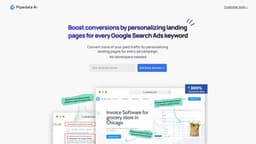
Pipedata AI is a platform that allows businesses to personalize their website experience and improve the performance of their Google Search Ads. It enables the creation of relevant landing pages for every keyword in Google Search Ads, leading to increased conversion rates. No developers are required to use the platform, making it accessible to businesses of all sizes.
What stands out?
Personalize headlines and copy on web pages
Customize images for different keywords
Optimize call-to-actions (CTAs) based on keywords
Tailor pricing information for each keyword
Modify testimonials and content posts
Customize feature sets and banners/logos
Self-service platform without the need for developers
Frequently Asked Questions
What is Pipedata AI?
How to use Pipedata AI?
What is Pipedata AI?
How can I use Pipedata AI?
What features does Pipedata AI offer?
What are the use cases of Pipedata AI?
How much does Pipedata AI cost?
More Information
Pipedata AI Company
Pipedata AI Company name: Pipedata .
Pipedata AI Login
Pipedata AI Login Link: https://app.pipedata.co/login
Reviews & Feedback
Share your experience with the community
0.0
Based on 0 reviews
User Comments (0)
Sort Criteria
Order
No reviews yet. Be the first to share your thoughts!
Statistics
Monthly visits
NaN
Saved by users
0
Rating
0.0/ 5.0
Added on
—
Use Cases
- Boost conversion rate from Google Search Ads
- Improve the performance of paid digital acquisition strategies
- Create personalized and adaptive web experiences
- Drive profitable growth globally
- Scale Google Search ads effectively
- Improve landing page relevance for ad clicks
How to Use
To use Pipedata AI, follow these steps: 1. Login to the platform. 2. Identify the keywords used in your Google Search Ads campaigns. 3. Select what elements you want to personalize on your website for each keyword, such as headlines, images, call-to-actions, pricing, testimonials, and more. 4. Customize the content for each keyword to create a personalized landing page. 5. Publish the personalized landing pages and track their performance. By personalizing your website for each Google Search Ad, you can drive higher conversions and improve your paid digital acquisition strategies without the need for developers.